


2 Player Games - Offline
4.794.00 Reviews
App Specs
- Version
- 1.5.6
- Updated On
- License
- Free
- Downloads
- 1,000,000+
- Developer
- Soup Ent
- Categories
- Board
- Platform
- Android
Screenshots
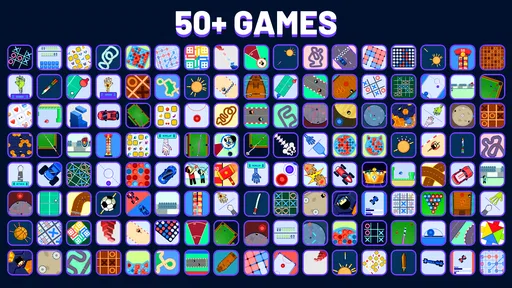
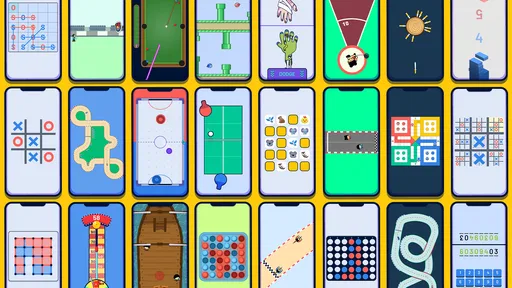
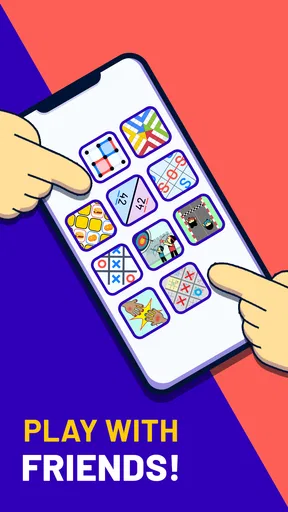



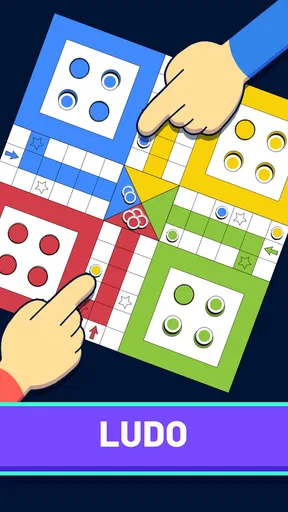

 Analysis by AppCompare
I like games that make it easy to share a few minutes with someone nearby, and an offline collection has a practical advantage: you can start a head-to-head session without first arranging a connection. That is the appeal of 2 Player Games - Offline. It is a free board game from Soup Ent, rated for Everyone, and its central idea is simple: choose a game and play together on one device. In my view, that makes it a useful option for brief, casual visits rather than a replacement for a deep, long-term game.
What to expect from a shared screen
The format suits two people who are already in the same place and are happy to take turns or compete on a shared screen. It can help fill an awkward pause while waiting for food, give siblings something to do during a quiet moment at home, or provide a low-effort activity on a trip. Because the games are gathered in one app, you can switch activities when one loses its appeal instead of needing to install several separate titles.
The collection includes familiar board-style choices alongside more action-oriented challenges. That range is handy when the people playing want different levels of thought or pace, though it also means the app is better approached as a sampler than as one carefully developed game. If your group wants a single rules-heavy strategy title, a dedicated board-game app is likely a better fit. If you want quick variety and a nearby opponent, this format makes more sense.
What’s the Deal with 2 Player Games - Offline?
2 Player Games - Offline is essentially a collection of simple yet engaging games that you can play with another person, all without requiring Wi-Fi or data. The app is packed with a variety of games that cater to different interests, ensuring that there’s something for everyone. From strategy to quick reflex tests, it’s a gaming haven for two!
Diverse Game Selection
One of the standout features of this app is its diverse game selection. You’ve got your classics like Tic-Tac-Toe and Checkers, but it doesn’t stop there. The app offers a variety of games that test your reflexes, strategic thinking, and even a bit of luck. It’s like having a mini arcade in your pocket!
Here’s a quick peek at what you can play:
- Ping Pong: Test your reflexes in this fast-paced game.
- Spinner War: Spin to win! A game of balance and speed.
- Air Hockey: Slide and score, just like in the arcade.
- Pool: A classic game of strategy and skill.
- Penalty Kicks: Soccer fans will love this one.
Choosing a game for the people playing
A useful way to get more from a mixed collection is to agree on the kind of round before handing over the phone. Tic-Tac-Toe or Checkers is a natural starting point if both players prefer taking time to think; Ping Pong or Air Hockey makes more sense when they want quick reactions. That small choice can prevent a mismatch where one person expects a calm turn-based game and the other is looking for a fast contest.
Worth Reading Before You Choose

EA SPORTS FC Mobile 26 Is a Bigger Football Game, but It Takes Time

Flipboard Shows What News Apps Must Do Beyond the Feed

Switching to Android Auto Means Rethinking Your Driving Routine

Google Calendar Makes a Crowded Week Easier to Manage

Ludo King Makes the Most of the Minutes Between Plans

Baby Panda World Brings Quick Play to Modern Phones, but Its Game Library Feels Busy
For a casual group, I would treat each game as a short activity rather than assume everyone will want to master every option. A quick match can reveal whether the controls and pace suit both players; if not, it is easy to move on. The trade-off is that variety does not guarantee equal appeal: a collection can offer several different styles, but a particular favorite may still be less polished or less satisfying than a dedicated app focused on that one game.
Easy to Use
One thing I absolutely love about 2 Player Games - Offline is how easy it is to use. The interface is straightforward and user-friendly, making it accessible for players of all ages. You just pick a game and start playing. No complicated menus or settings to deal with. It’s as simple as “tap and play.”
Readability, navigation, and shared-device comfort
Simple navigation matters when two people are sharing one phone: neither player should need a long explanation before a round can begin. I find the pick-and-play approach especially useful when a child and an adult are taking turns, or when someone has only a little patience for menus. The Everyone age rating also makes the game suitable for a broad household audience, though that rating is not a promise that every person will find the display or controls comfortable.
For a fair start, I recommend letting both players see the screen before choosing, then checking that each understands whose turn it is. This is a small but practical shared-device habit: it reduces confusion when the phone changes hands and makes a short session feel more relaxed. If a player has low vision, reading comfort can depend on the device and the game in use, so it is sensible to try a familiar option first rather than assume every screen will be equally clear.
Motor and sensory considerations
The collection’s different styles create different physical demands. A turn-based choice such as Checkers gives players time to consider a move, while reflex games such as Ping Pong and Air Hockey place more emphasis on timely touches. That means the best choice can depend not only on taste but also on dexterity, reaction speed, and comfort with a busy screen. I would start with a slower game if quick tapping is tiring or difficult, then switch only if both players want a faster challenge.
Sound and movement can also affect the experience in a shared room, especially in a quiet café or during travel. I would keep the session considerate of people nearby and choose a calmer option when a rapid game feels distracting. There is no need to treat one play style as the default: the collection is most welcoming when players agree on a pace that works for both, and when nobody is pressured to keep up with a faster opponent.
Offline use in everyday situations
This is most useful when the other person is physically with you. On a road trip, for instance, two passengers can take turns during a stop without depending on a signal; at home, family members can share a short match while waiting for dinner. It is not the same as online multiplayer: someone in another location cannot join simply because the game works without Wi-Fi. That distinction is worth keeping in mind if you are looking for remote play rather than a local, face-to-face activity.
Offline play can also make the app a handy backup when reception is unreliable, but I would still open it before leaving home if I planned to rely on it. That gives me a chance to choose a game and confirm the app is ready while I have a connection, rather than troubleshooting during a brief window of free time. The central advantage is convenience, not a guarantee that every situation or device will feel equally comfortable.
Perfect for On-the-Go Fun
This app shines brightest when you’re on the go. Whether you’re on a road trip, camping, or just sitting in a café with no Wi-Fi, 2 Player Games - Offline keeps the fun going. It’s perfect for those moments when you need to pass the time without draining your data plan.
Who will enjoy it, and who may prefer something else
I would recommend it to friends, couples, siblings, and families who often have a shared phone and want a quick activity with little setup. It is also a sensible choice for people who would rather keep a small selection of different contests in one place than decide which separate game to download. Its average rating is 4.7 from around 2,300 ratings, and it has passed 500,000 installs, which suggests a substantial audience has found the basic idea appealing.
I would skip it if your main goal is online competition, a detailed campaign, or a single board game with extensive strategy and progression. A dedicated title usually gives more room to learn one ruleset, while a tabletop game may be a better choice for players who want larger pieces and a screen-free experience. This app’s strength is spontaneous, local variety; that same breadth means it may not satisfy someone looking for depth in one particular game.
Cost, version, and practical expectations
The game is free to download, with optional in-app purchases listed between $1.99 and $4.99 per item. I would treat those purchases as optional rather than assume they are necessary to enjoy a casual session; if you are setting it up for a child, it is sensible to review purchase settings on the device first. The current version is 1.4.9, and the minimum operating system is 7.1, so checking compatibility before installing is a straightforward way to avoid disappointment on an older device.
One practical question is whether it can replace a set of separate games. For a family that wants to try different quick contests, it can reduce app switching and make choosing an activity easier. For a group that returns to one favorite repeatedly, a specialist alternative may offer a more focused experience. Another question is whether it works for more than two people: the game is presented for two to four players, so it can suit a small group, although the best fit will depend on the particular activity and how comfortably everyone can see and reach the shared screen.
No Ads to Ruin the Experience
If there’s one thing that can ruin a gaming session, it's intrusive ads. Thankfully, 2 Player Games - Offline keeps the ad interruptions to a minimum, allowing you to enjoy uninterrupted playtime. This is a huge plus in my book, as it keeps the focus on the fun and not on closing pop-up ads.
Remaining barriers and a fair way to try it
Shared-screen play is convenient, but it also has limits: a phone is small for two people, and each player may have a different preferred pace or level of precision. A quick-reaction round can be frustrating if one person has difficulty with rapid touches, while a quiet, turn-based game may feel slow to someone else. I would not call the collection universally accessible; instead, I see its range as a chance to find a better match for the people present, with some activities likely to suit them more than others.
To test that fit, begin with a familiar, slower option, make sure both players can comfortably follow the screen, then try a faster game only if it sounds enjoyable to both. If reading the display is uncomfortable, a larger device may help, but it does not change the app’s shared-screen design. For a player who needs specific accessibility controls or a highly adjustable presentation, I would choose a game that clearly provides those options rather than rely on assumptions.
Why You Should Download It
In today’s world, where we’re constantly connected, it’s refreshing to find an app that encourages face-to-face interaction without the need for an internet connection. 2 Player Games - Offline brings back the joy of playing games with another person, making it a must-have for anyone who loves simple, fun, and engaging games.
So, if you’re looking for a way to pass the time with a friend without the hassle of finding Wi-Fi, give this app a try. You might just find yourself reaching for it more often than you’d expect. Happy gaming!
My inclusive verdict
For me, the strongest case for this collection is a simple one: it makes a nearby shared game easy to start, even when internet access is not part of the plan. Its mix of thoughtful and quick-play choices gives two or more people a chance to find a pace that feels comfortable, but the small shared screen and varied control demands remain real considerations. I would keep it in mind for family downtime, travel breaks, and casual visits, while choosing a focused or accessibility-specific alternative when those needs matter more than instant variety.
Pros
- Wide variety of game genres.
- No internet required for play.
- Easy to navigate interface.
- Minimal ads for free users.
- Quick setup and play sessions.
Cons
- Limited single-player options.
- Graphics are quite basic.
- Some games lack depth.
- Occasional in-app purchase prompts.
- No cloud save feature.
FAQs for 2 Player Games - Offline
What is 2 Player Games - Offline, and how does it work?
2 Player Games - Offline is an app designed for users who enjoy playing games with a friend on the same device. It offers a variety of mini-games that can be played without an internet connection. Each game is crafted to be simple yet engaging, providing fun and competitive experiences for two players.
Do I need an internet connection to play 2 Player Games - Offline?
No, you do not need an internet connection to play 2 Player Games - Offline. The app is specifically designed for offline play, allowing you to enjoy games anywhere without worrying about Wi-Fi or data usage. This makes it ideal for travel or areas with limited connectivity.
What types of games are included in 2 Player Games - Offline?
2 Player Games - Offline includes a diverse selection of mini-games, ranging from puzzles and racing to strategy and action. Each game is designed to be quick and easy to play, making them perfect for short sessions. The variety ensures that there’s something fun for everyone.
Is 2 Player Games - Offline suitable for all ages?
Yes, 2 Player Games - Offline is suitable for players of all ages. The games are designed to be family-friendly, with intuitive controls and straightforward gameplay. This makes it a great option for family gatherings or playdates where players of different ages can enjoy together.
Are there any in-app purchases or ads in 2 Player Games - Offline?
2 Player Games - Offline is free to download, but it might contain ads to support the developers. Some games may offer optional in-app purchases to enhance the gaming experience, such as unlocking additional content or removing ads. Always check the app’s settings for purchase options.


